
Client-side implementation
How to configure a SIMID-compatible player application to support non-linear ad insertion
This page only covers the implementation for SIMID-compatible client platforms (web, CTV, iOS, Android/AndroidTV). Check Fallback mechanisms for other devices
Client-side Components
The following functional client-side components are involved in the flow sequence:
- App: The application / page that controls user interactions and the interactions between the main other client-side components
- Video Player: the component in the app that streams and renders the video
- Smartlib: the client-side Broadpeak SDK that manages interaction with the BkYou/broadpeak.io platform to receive metadata on inserted linear ads and non-linear ads to to be inserted
- Smartlib Session: the object that manages individual playback sessions (specific to the stream and user)
- SIMID Creative: the SIMID non-linear ad. It's an HTML document that contains the visual part of the ad and implements part of the SIMID protocol.
- SIMID Controller: the component or object in the app that manages the display of SIMID creatives, typically through the management of a WebController object. The SIMID controller implements part of the SIMID protocol.
For clarity about client-side responsibilities in this document, we introduce this component separate from the App itself. Naturally, application developers have the choice of how they model this distinction within the app. - Web Controller: the element in charge of loading and displaying the SIMID creative (HTML). This object depends on the device type: WebView (Android), WKWebView (iOS) or iframe (Web)
SIMID Controller
Open-source referenceBroadpeak provides an open-source reference implementation of a SIMID controller that can be integrated in a web, Android or iOS app. It does implement most of the SIMID specification, and is maintained regularly.
https://github.com/Broadpeak-tv/simid-controller
The repository also offers sample web, Android and iOS apps to illustrate the workflow documented in this page.
The rest of this page explains the client-side implementation based on the use of the open-source implementation of the SIMID controller. If you build your own implementation of the SIMID controller, you will need to adapt accordingly.
Note also that data flows and APIs documented here are mostly the same for all devices (web, Android, iOS). However, exact function and method names and data types may vary between platforms. This page will provide examples for Android, unless specified otherwise. Where relevant, differences for iOS (Swift) are called out explicitly; unless stated otherwise, iOS follows the same conventions as Web.
Role
The role of the SIMID controller is best understood from its relationship to the other component:
- The app receives programmatic events from the SmartLib. The events carry information that indicates whether non-linear ads were returned by the ad server.
- The app instantiates a SIMID controller to display the non-linear ad.
These instructions are represented in the diagram below with the terms "init", "load url", "show" and "destroy". These names are purely informative, and the choice of implementation of these interactions between the App and the SIMID controller are in the hands of the application developer
- The SIMID controller listens to the events that the Creative (loaded in a web view) sends - see “SIMID Implementation” below
- The SIMID controller propagates the information captured from those to the SmartLib, enabling it to react accordingly. - see “Event listener” below
This functionality is necessary to ensure that the Smartlib can have access to certain information that passes between the SIMID Controller and the SIMID Creative, on all devices, particularly those on which events cannot be listened to by all components (e.g. Android and iOS). This is critical in particular for the purpose of ensuring that insertions are tracked correctly. see “Event listener” below
SIMID Implementation
The controller implements the SIMID specification, and must at minimum support the following methods and messages:
- Section 8 - Protocol
- Section 4.3 - "Messages from the player" - sent by the SIMID controller to the Creative
- Section 4.4 - "Messages from the Creative to the Player" - sent by the SIMID Creative to the SIMID controller. The need for supporting these messages will depend on the type of creative templates used in your configuration. The following may likely be relevant:
- 4.4.1 -
SIMID:Creative:clickThru- for interactive creatives, to notify the application (and SmartLib) that the user has clicked the ad. - 4.4.4 -
SIMID:Creative:fatalError- error reported by the SIMID creative - 4.4.14 -
SIMID:Creative:requestPlay- typically for creatives used for Pause Ads, providing buttons for resuming playback - 4.4.16 -
SIMID:Creative:requestSkip- for creatives that provide a way to discard them - 4.4.15 -
SIMID:Creative:requestResize- necessary to enable ads that don’t overlay over the video, such as in L-Shape scenarios - see “Player Resizing” below for more information
- 4.4.1 -
Other SIMID messagesThe SIMID spec contains other messages. Those are not currently deemed to be necessary for SIMID ads generated by broadpeak.io (whether static of interactive). They may however be required for 3rd party SIMID creatives
The payload of SIMID messages is defined in the SIMID specification, and in most cases is wrapped into a common enveloppe.
| property | type | example |
|---|---|---|
| sessionId | string | “173378a4-b2e1-11e9-a2a3-2a2ae2dbcce4” |
| messageId | int | 0 |
| timestamp | long | 1564501643047 |
| type | string | “createSession” |
| args | map<string, any> | depends on each message type, see the SIMID spec |
Event listener
The SIMID controller must propagate SIMID messages in such a way that the SmartLib can listen to them. This is critical in particular for the purpose of:
- automated ad tracking
- automated error catching and tracking
To do so, in our open-source implementation, the application needs to create an instance of a GenericSimidControllerApi class (bundled with the SmartLib) and pass it to SmartLib with session.attachSimidController().
Whenever a SIMID controller receives a SIMID message from the creative, it fires the method onMessageReceived() of that instance with the message envelope encoded as a JSON string.
Conversely, when a SIMID controller sends a SIMID message to the creative, it fires the method onMessageSent() from that instance of GenericSimidControllerApi, with the message sent encoded as a JSON string.
The instance of
GenericSimidControllerApiis created once and attached once per streaming session, withsession.attachSimidController(). This is the object that SmartLib actually listens to.The SIMID controller itself (the object that manages the WebController and speaks the SIMID protocol with the Creative) is instantiated separately, once for every ad that has a non-linear component. Each new SIMID controller instance is given a reference to the single, session-scoped
GenericSimidControllerApiinstance, and forwards every message it receives from or sends to the Creative to that instance (by calling itsonMessageReceived()/onMessageSent()methods as described above). This is how SmartLib can keep listening to SIMID messages across an arbitrary number of ads within the session, without needing to re-attach a new listener for each one.
Overall flow
The solution has been architected to ensure minimal changes in the Smartlib compared to standard SSAI linear ads flows (documented at https://delivery-platform.broadpeak.tv/smartlib/public/ad-insertion/integration). Familiarity with those flows is assumed in the remainder of this document.
A “new” icon 🌟 is used below to highlight areas specific to flows with non-linear ads which require specific and additional handling by the app or player developer.
In-band implementationThe flow described below is primarily for in-band ads.
Implementation for out-of-band ads require additional steps on top of this in-band implementation. See Pause Ads for details.
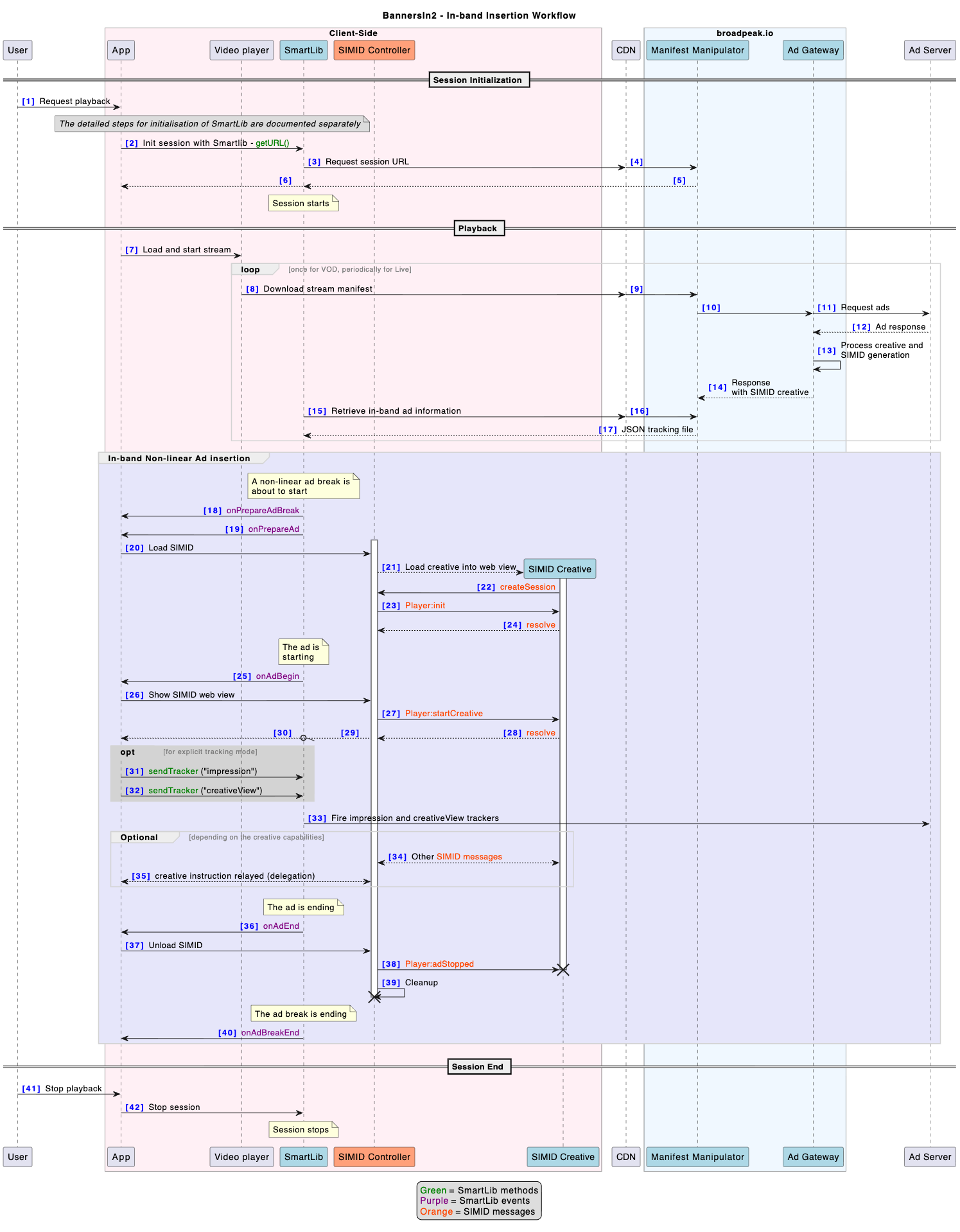
-
When the app launches, SmartLib is initialised
-
For each video load (i.e., each channel change), a SmartLib session is created
-
The app calls
SmartLib.getInstance().createStreamingSession()and stores thesessionobject. -
The app attaches the video player instance to Smartlib with
session.attachPlayer(playerInstance). -
🌟 The app creates a single instance of
bpkSimidController, valid for the whole session. Some of the SIMID messages received from that point on must be forwarded usingbpkSimidController.onMessageReceived(messageStr)for received messages andbpkSimidController.onMessageSent(messageStr)for sent messages. Every SIMID controller instance created later on (see 3.2.3 below) will need to keep a reference to thisbpkSimidControllerinstance in order to perform that forwarding.- On Android and iOS),
GenericSimidControllerApiis an abstract class: the app must extend it (e.g.class BpkSimidController : GenericSimidControllerApi()) and override at leastgetSimidControllerName(). - On Web,
GenericSimidControllerApican be instantiated directly (new GenericSimidControllerApi()), with no subclassing needed, since the class already provides default, harmless implementations of its methods.
- On Android and iOS),
-
🌟 The app attaches the
bpkSimidControllerinstance to the session withsession.attachSimidController(bpkSimidController). This allows SmartLib to listen to the messages forwarded to that instance. -
The app calls
session.setAdEventsListener(…)so that the app can receive ad events. -
The app calls
session.getURL(contentURL)to start the streaming session.
-
-
When SmartLib detects an ad break
-
🌟
onPrepareAdBreak(adBreakData)is triggered a few seconds before the start of the ad break, in all cases (whether the ad break contains linear non-linear ads). In most situations, this event can be ignored, but could be useful in specific scenarios. -
🌟
onPrepareAd(adBreakData, adData)is triggered a few seconds before the start of an ad-
🌟 The app determines if the ad has non-linear ads attached
-
on Web and iOS, this is done by looking up the field
adData.adType, which will contain one of the following values:linear The ad only contains a linear creative nonlinear The ad only contains a non-linear creative linear_and_nonlinear The ad contains both linear and non-linear creatives -
on Android, this is done by calling
adData.getType(), which returns an enum valueAD_LINEAR The ad only contains a linear creative AD_NON_LINEAR The ad only contains a non-linear creative AD_LINEAR_AND_NON_LINEAR The ad contains both linear and non-linear creatives
-
-
🌟 If a non-linear creative is present, the app retrieves the metadata for the SIMID resource:
- On Web and iOS, by looking up
adData.nonLinearIframeResources - On Android, by calling
adData.getNonLinearIframeResources()
Both return an array of objects with the following properties:
property type description creativeId string ID of the creative to display url string URL of the SIMID resource parameters string Contains information that needs to be passed to the SIMID Creative through the Player:init. It contains a stringified JSON string, which the SIMID creative will parse and interpret it. clickURL string Click-through URL (typically for the landing page) - On Web and iOS, by looking up
-
🌟 The app instantiates a new SIMID controller for this specific ad, which loads the SIMID creative from that URL.
- This new instance is given a reference to
bpkSimidControllerso that it can forward messages to it - see “Event listener” and step 2.c above.
- This new instance is given a reference to
-
The SIMID Creative exchanges a few messages with the SIMID controller to ensure everything is working properly:
createSession,Player:init,resolve- see section 6.2 “Workflow Initialization” of the SIMID specification. -
The SIMID Controller (the per-ad instance) propagates those messages to
bpkSimidController(the session-scoped instance) withbpkSimidController.onMessageReceived(messageStr)andbpkSimidController.onMessageSent(messageStr), which in turn allows SmartLib to observe them.
-
-
onAdBreakBegin(adBreakData)is triggered when the ad break starts. -
onAdBegin(adBreakData, adData)is triggered when an ad starts.- 🌟 The app instructs the SIMID controller to display the SIMID Creative (if one was successfully prepared in
onPrepareAd()) - The SIMID Creative exchanges a few messages with the controller:
Player:startCreative,resolve- see section 6.3 “Typical Start Creative Workflow” of the SIMID specification: - 🌟 The SIMID Controller instructs the app to show the WebController to the end-user.
- Smartlib detects that the ad has been shown and automatically fires the appropriate ad trackers. Optionally, this can be done explicitly by the application instead (see "Ad Tracking" below).
- 🌟 Optionally, the SIMID Creative optionally sends a
Creative:requestResizemessage to instruct the app to resize the player. The app resizes the video player component accordingly - see “Player Resizing” below for more information. - 🌟 Depending on the specific SIMID creatives used, other messages can be sent by the creative, which are relayed to the app by the SIMID controller. For example: requests to skip, requests to play, clickthrough notifications, etc.
- The SIMID Controller continues to propagate all messages to SmartLib with
bpkSimidController.onMessageReceived(messageStr)andbpkSimidController.onMessageSent(messageStr).
- 🌟 The app instructs the SIMID controller to display the SIMID Creative (if one was successfully prepared in
-
onAdEnd(adBreakData, adData)is triggered when the ad ends- 🌟 The app instructs the SIMID Controller to hide the SIMID Creative
- 🌟 The app resets the size of the video player if necessary
- 🌟 The app can dispose of the per-ad SIMID controller instance created in step 3.2.3, since a new one will be created for the next ad, if any.
-
onAdBreakEnd(adBreakData)is triggered when the ad break ends- 🌟 The app can use this event to free the memory of the SIMID controller (if appropriate)
-
Sample Code
Please refer to SIMID controller repository for reference implementation:
- Web: SIMID Controller and demo app
- Android: SIMID Controller and demo app
- iOS: SIMID Controller and demo app
Ad Tracking
Non-linear ads are typically tracked with 2 types of beacons:
- impression - they are valid for the whole ad, whether or not they contain linear and/or non-linear components.
- creativeView - these apply at the level of the creative itself, and are normally triggered at the same time as the impression.
In most scenarios, SmartLib will automatically send both trackers when it detects that the creative has been displayed (ie. then the SIMID creative resolves the SIMID:Player:startCreative message.
Explicit firing
However, to enable more complex use cases (or integrations in which the SIMID Controller does implement the GenericSimidControllerApi), the application has the ability to trigger those events explicitly, after ensuring that the creative has been displayed correctly.
- You first need to set the boolean SmartLib session option
AD_TRACKERS_NON_LINEAR_AUTO_SENDto false - You then need to use the session's
sendTracker(trackerType, adId)method for each tracker type:impressioncreativeView
adId should be set to the identifier of the current ad (which was obtained from the AdData object in the onAdBegin event. If not set, SmartLib will attempt to determine it automatically.
Error handling
When errors occur (whether determined by the SIMID controller or the creative itself, for example when a creative is missing, or when the creative refuses to be displayed), SmartLib will automatically fire an error beacon for that ad. This too relies on the SIMID Controller implements the GenericSimidControllerApi, just as for automated ad tracking.
Here again, the application can elect to take control, and can trigger the error with session.sendTracker("error", adId).
Reacting to creative messages
Depending on the type of creative being used (and therefore the type of Creative templates), specific messages may be received by the SIMID Controller, which will need the application to handle.
Player resizing
To enable the display of non-linear ads around the video content and avoid obscuring part of the content, the SIMID creative will send a SIMID:Creative:requestResize command to the SIMID controller, with the calculated coordinates and dimensions (in pixels) of the area of the creative within which the video needs to be displayed.
The dimensions returned take into account the dimensions of the player component and of the creative.
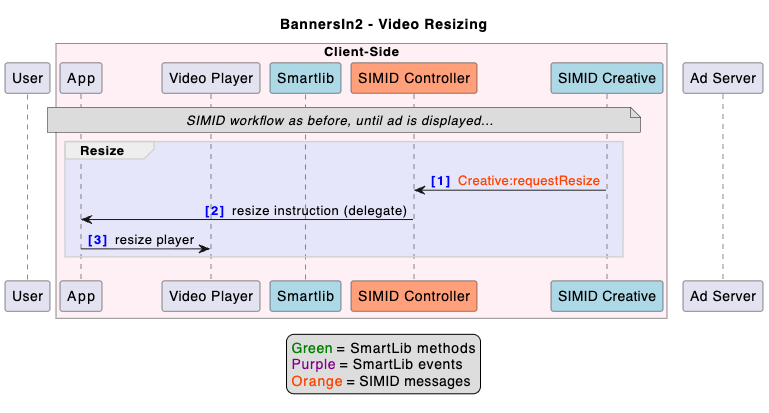
The SIMID controller passes those dimensions to the app, which must resize the video component accordingly. If transitions are warranted for a better user experience (such as a gradual squeeze back), it is the responsibility of the application to apply them.
Deviation from SIMID specThe SIMID spec (latest v1.2) indicates that:
SIMID does not support L-shaped ads that resize the video player without an overlay covering the video
and that, instead
The video asset will need to be cropped or resized to allow the interactive creative to be put into the correct place
This constraint is not workable, in particular in a SSAI solution supporting non-linear ads (such as L-Banners), especially when they don’t accompany a corresponding linear creative and are therefore to be displayed alongside the main content.
Our solution therefore requires a small “deviation” from the standard specification, to allow a creative to inform a player/app of the need to resize the video component and make it smaller than the (full-frame) creative. This is possible without any change to the SIMID message syntax.
Example
For simplicity, we use a 4-tuple to represent a Dimensions object: (x, y, width, height)
This example assumes that
- the display has a natural 4K (3840x2160) resolution
- This is sent by the SIMID controller to the creative in the
SIMID:Player:initmessage
- This is sent by the SIMID controller to the creative in the
- the source image (returned by the ad server) has a resolution of 1920x1080, with a media area declared as (200, 0, 1720, 968)
- This information is passed by the Smartlib to the Creative through the
SIMID:Player:initmessage, in particular theCreativeData.adParameters
- This information is passed by the Smartlib to the Creative through the
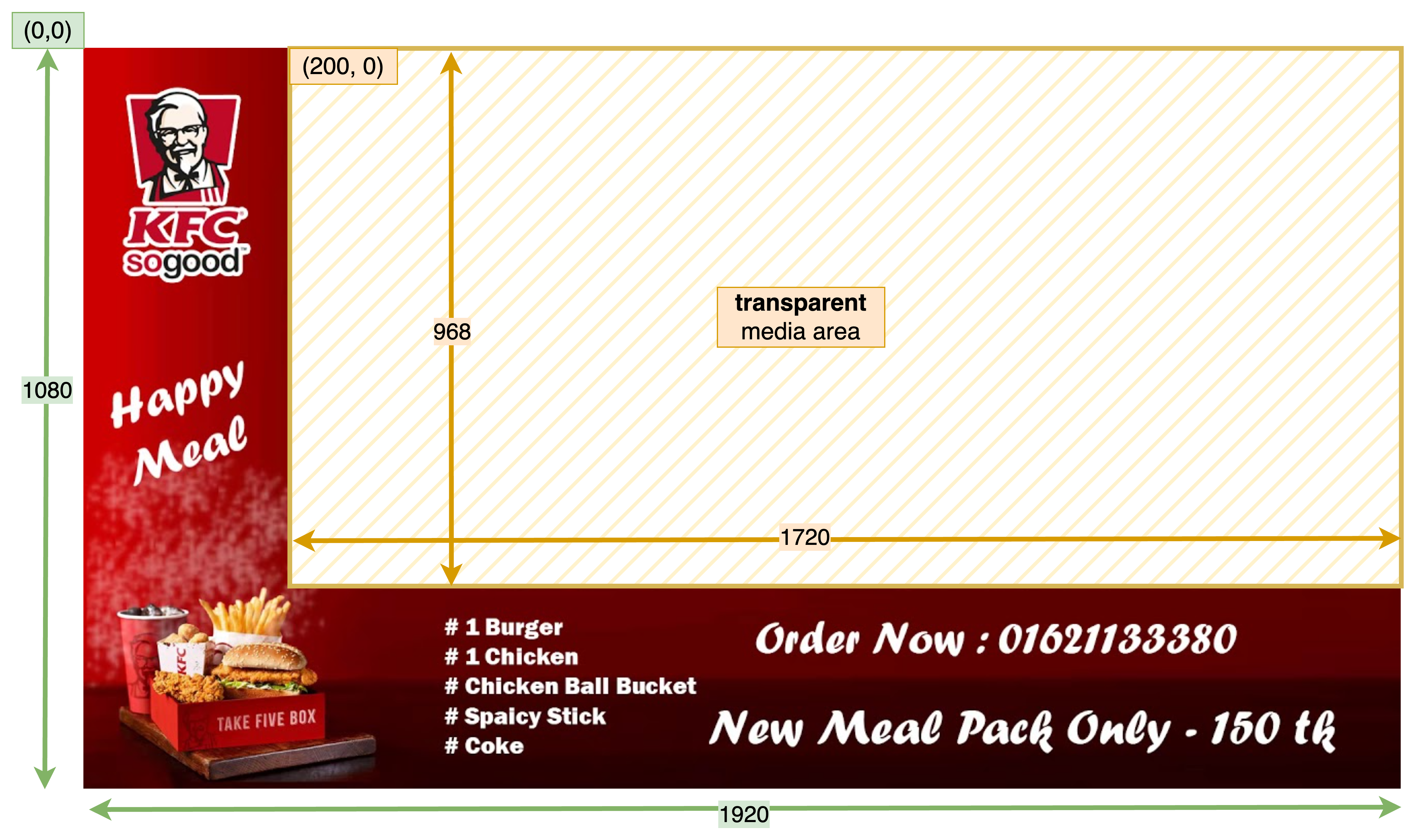
non-linear ad creative, with dimensions
On that basis, the creative will calculate and send a SIMID:Creative:requestResize message with the following payload
- creativeDimensions: (0, 0, 3840, 2160)
- mediaDimensions: (400, 0, 3440, 1935)
The application performs the resize of the video player accordingly:
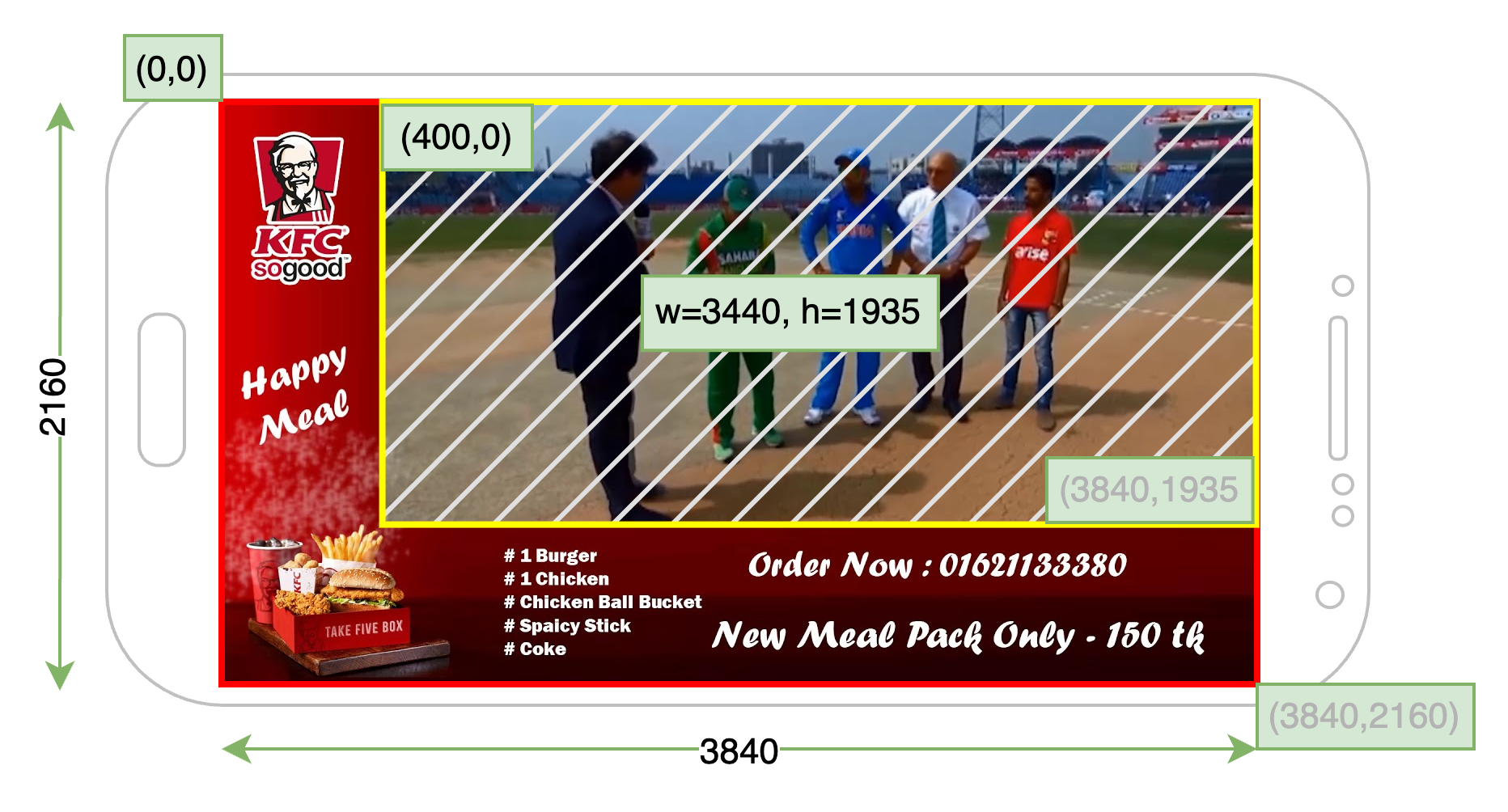
Application, with resized video player (hashed area)
It is critical that the player not send a SIMID:Player:resize after receiving and resolving a SIMID:Creative:requestResize
Ad dismissal
Creatives can offer a way for users to interact and request to discard the non-linear ad.
In this case, the SIMID creative will send a SIMID:Creative:requestSkip message to the SIMID Controller. The application may then decide to terminate the ad before its scheduled end, by essentially following the same steps as on an onAdEnd event (step 3.e. in the flow above)
Click-through
Ads may be decorated with a click-through URL in their metadata, typically with the URL to a landing page.
On devices that support the ability to open a browser app or page, a SIMID Creative might provide a button or other mechanism to enable the users to "click" the ad and be directed to the landing page.
In this case, the creative will send a SIMID:Creative:clickThru message to the SIMID Controller. This message's payload will carry 2 parameters:
- A boolean indicating whether it is the application's responsibility to redirect the user
playerHandles=true) or whether it's the creative itselfplayerHandles=false). - The click-through URL (optional)
If playerHandles is true and the click-through URL is set, the application will need to open the web page in whichever way is relevant for that specific client platform.
Usually, the application will also pause playback, although that is scenario-dependent and left at the discretion of the app developer.
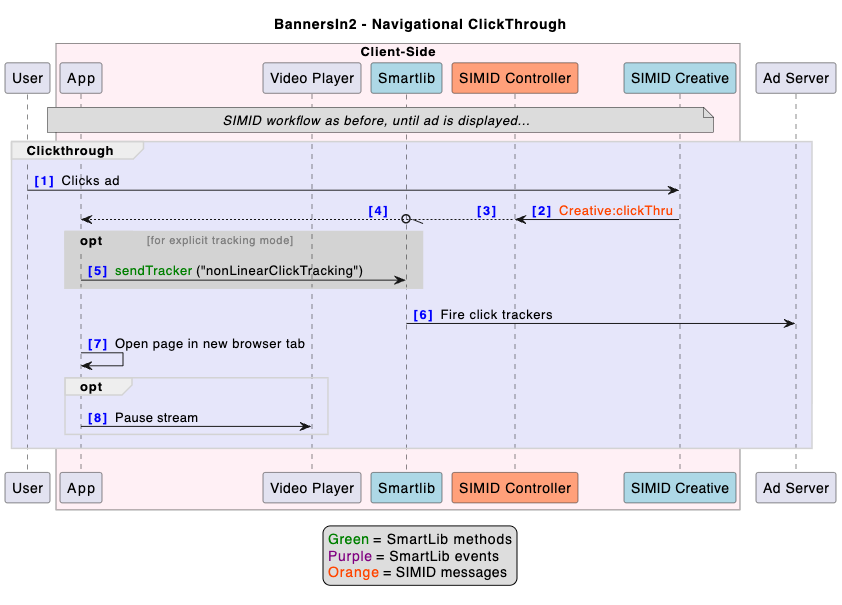
For the creative to be able to set
playerHandlestotrue(which will usually be the case), the SIMID controller needs to be configured in such a way that it sends anavigationSupport=playerHandlesin theSIMID:Player:initmessage to the creative.
Transactional click-throughThe Broadpeak Click2 solution for interactive advertising may make use of click-through URLs that are not landing pages (navigational), but instead are programmatic notifications to remote endpoints. In this case, when the user "clicks" the ad, the creative will send
playerHandles=falseand/or an empty click-through URL. The application can simply ignore those messages.
Click tracking
As long as the SIMID Controller implements the GenericSimidControllerApi, SmartLib will automatically fire the click tracking beacons associated with that ad, whether it uses navigational or transactional click-through URLs.
In more complex cases, and as for the other ad and error tracking use cases, SmartLib can also be explicitly instructed to fire them, with session.sendTracker("nonLinearClickTracking", adId) . This must be done before the player opens the landing page.
Miscellaneous considerations
A complete implementation on the client side will also need to take some additional constraints into account
Full-screen playback
On mobile devices and mobile browsers, application developers must intercept any full-screen request before it reaches the native player. Native full-screen mode usually does not permit overlays (such as SIMID overlays) to remain visible and interactive.
Instead, the application should implement simulated full-screen: expanding a container element to fill the viewport, so that the SIMID creative stays within the same rendering context as the player.
Visual transitions
Visual transitions — such as a fade-in as the ad appears and a fade-out as it disappears — are in most cases the responsibility of the application, as the SIMID protocol does not support them.
They are easily implemented with CSS transitions on the iframe, and equivalent techniques on web views in native apps, as part of the logic attached to the handling of the web view being shown (step 3.d.iii.).
Metadata injection
Some creative templates accept additional data beyond what the ad server provides, used to show content information on top of the ad (such as in some Pause Ads), or to tailor the presentation of the creative.
Since it is not sent by the ad server, the application needs to obtain and provide this data to the creative.
This requires enriching the ad parameters exposed by the SmartLib in the onPrepareAd event. The application need to:
- extract the
adData.nonLinearIframeResources.parametersstring - parse it as a JSON object
- add or overwrite the appropriate fields within it
- turn it back into a string
- pass it to the SIMID controller when it initializes the SIMID creative.
The exact fields to set are template-dependent and documented separately.
Updated about 2 months ago