
Pause Ads
How to implement Pause Ads using the BannersIn2 out-of-band trigger mechanism
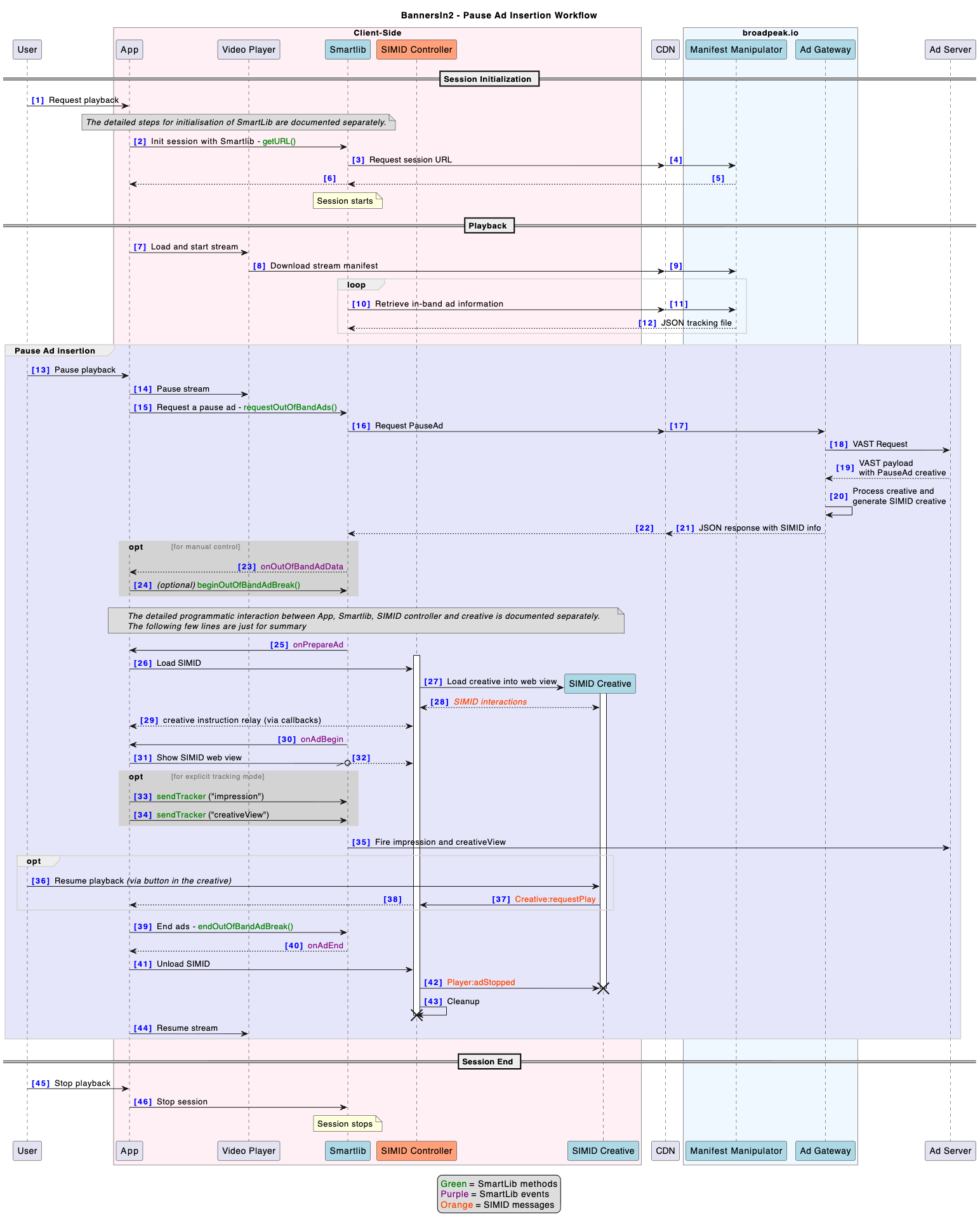
Pause Ads are non-linear ads displayed when a user pauses the stream. They are powered by the BannersIn2 out-of-band trigger mechanism: unlike in-band non-linear ads — which are inserted as a result of signals in the stream or the ad server response — Pause Ads are initiated from the client side and have no fixed duration.
This page covers only the aspects specific to Pause Ads. It assumes familiarity with the standard BannersIn2 client-side integration described in Client-side Implementation, including SmartLib session setup, SIMID controller attachment, and the
onPrepareAd/onAdBegin/onAdEndevent flow.
Requesting a Pause Ad
The Pause Ad workflow is triggered when the app detects that the user has sent a pause event to the player. A specific requestOutOfBandAds() SmartLib API is used to initiate the out-of-band ad request:
session.requestOutOfBandAds("pause", 0, true, {})| Parameter | Type | Description |
|---|---|---|
name | string | Must be "pause". |
duration | number | Must be 0 or left undefined — Pause Ads have no fixed duration. |
autoBegin | boolean | When true, SmartLib automatically triggers ad events (onPrepareAd, onAdBegin, etc.) as soon as ad data is available. See section "Manual control" below for more |
additionalQueryParams | object | Key/value pairs sent to broadpeak.io in addition to the query parameters passed on the URL in session.getURL(). |
Recommended delay
A grace period between the user pressing pause and the requestOutOfBandAds() call is recommended. This ensures accidental triggers don't waste ad impressions or degrade the user experience. A typical threshold is in the 3–5 second range.
The easiest approach is to have the application wait before making the requestOutOfBandAds() call. Alternatively, the call can be made immediately with autoBegin set to false, and the display delayed by calling beginOutOfBandAdBreak() (as described below) — though this is less preferable, as the ad will already have been served from the ad server regardless.
Preparing and displaying the Ad
If autoBegin is set to "true", the standard BannersIn2 event sequence applies as soon as the ad data becomes available. Loading the SIMID creative and displaying it follow the same logic as for in-band non-linear ads — see Client-side Implementation for full details.
Manual control
It may be desirable in some scenarios to take more control over the timing of events. By setting autoBegin to false the application has to then take the following additional steps before the standard SIMID workflow:
- An
onOufOfBandAdData(AdBreakData)event can be registered viasession.setAdDataListener(). It fires as soon as ad data is returned by broadpeak.io — including if no ad was returned, in which case it contains an empty array. - The
AdBreakDataobject contains anoobafield with the parameters originally sent torequestOutOfBandAds(), which can be used to identify the break type. - The ad break must be started explicitly with
beginOutOfBandAdBreak(adBreakId).
Resuming Playback
Pause Ads have no duration of their own. The application must keep track of whether a pause ad break is active and its identifier, in order to end it at the right time.
There are two ways the ad can be dismissed and playback resumed:
-
Interaction with the creative
If the SIMID creative includes a button to resume playback, the creative sends
SIMID:Creative:requestPlayto the SIMID controller. The application reacts by sendingSIMID:Player:adStoppedback to the creative (via the controller), then callsendOutOfBandAdBreak(adBreakId). -
Interaction with the player
Alternatively, the user interacts with the application directly — such as by pressing the play button on a remote or a player control overlay — without interacting with the creative. The application calls
endOutOfBandAdBreak(adBreakId).
In both cases, endOutOfBandAdBreak(adBreakId) triggers the standard end-of-ad flow (onAdEnd, onAdBreakEnd), which terminates the ad and resets the controller.
Dismiss without resuming
A SIMID creative may also offer a dismiss button that allows the user to close the ad without resuming playback. In this case, the creative sends SIMID:Creative:requestSkip to the SIMID controller, which triggers the mechanism for removing the ad, as described in Ad dismissal.
Ad Rotation
Usually a single ad is shown for the duration of the pause. It is however possible to rotate between ads. The easiest mechanism is to call requestOutOfBandAds() periodically, and when successful, end the previous break with endOutOfBandAdBreak() and begin the new one with beginOutOfBandAdBreak(). The ad server should always return a single ad per request.
Combining with Other Ad Breaks
When content is monetised with other forms of advertising — such as linear or other non-linear in-band ads — you may want to avoid showing a Pause Ad if the user presses pause during another ad. It is the application's responsibility to determine whether and when to call requestOutOfBandAds() and/or beginOutOfBandAdBreak().
If using broadpeak.io's DAI solution to insert in-band ads, you can rely on SmartLib's ad lifecycle events to track whether ads are currently being shown, and make the Pause Ad call conditional on that.
Updated 3 months ago