
Fallback mechanisms
Alternative ways to manage new non-linear ad formats for devices not compatible with SIMID
As described in the introduction to BannersIn2, this SIMID-based solution is not compatible with all devices, in particular those that cannot render a web view on top of the video player.
The BannersIn2 solution does provide a fallback mechanism for those devices with a workflow very similar, although the app developer will have the additional burden of handling the interpretation of all ad parameters, rendering of the ad, error handling, tracking, etc.
Overall flow
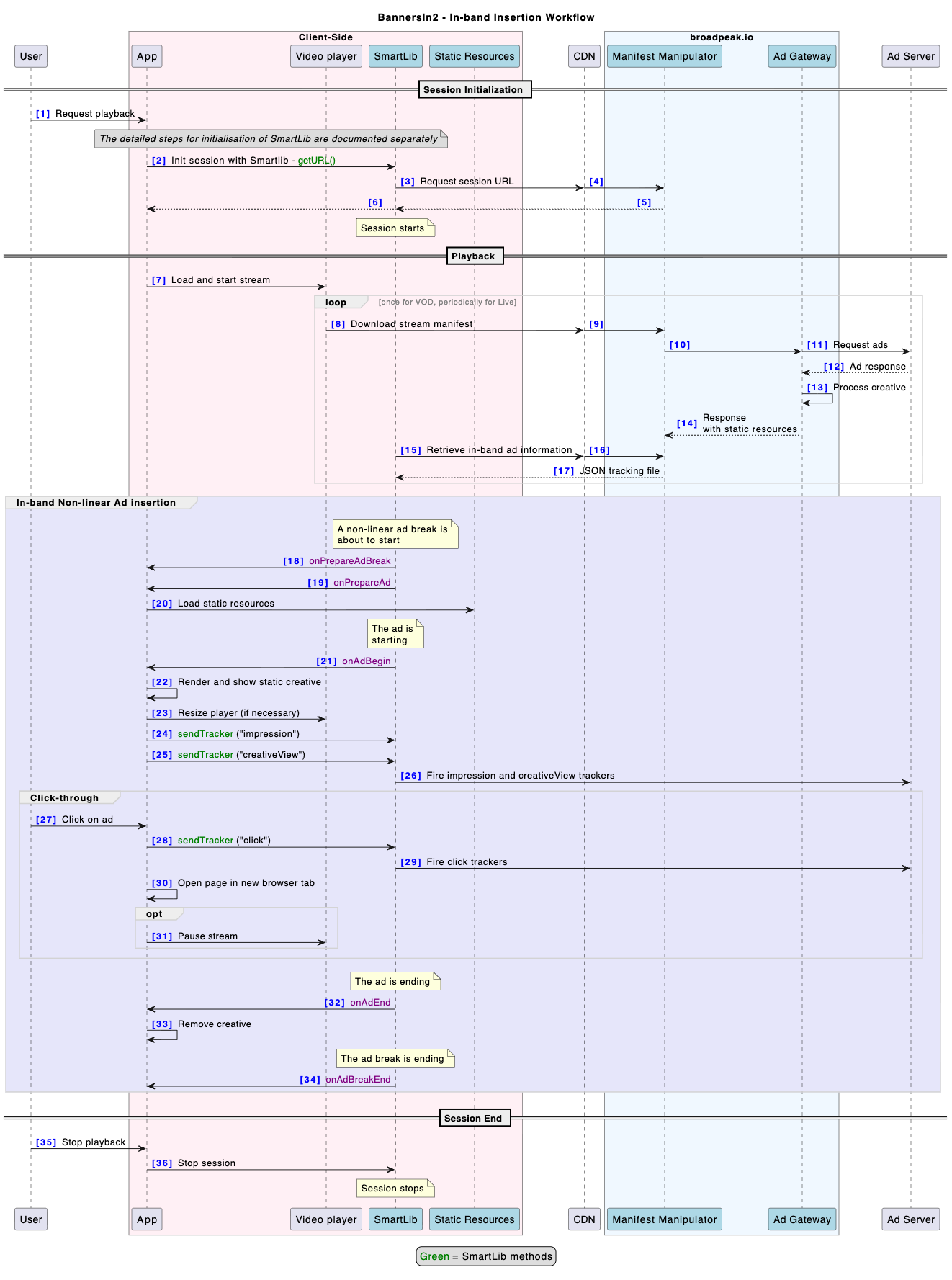
The flow is very similar to the one presented in Client-side implementation, but there is no SIMID controller, nor any SIMID self-contained creative.
-
When the app launches, SmartLib is initialised
-
For each video load (i.e., each channel change), a SmartLib session is created
- The app calls
SmartLib.getInstance().createStreamingSession()and stores thesessionobject. - The app attaches the video player instance to Smartlib with
session.attachPlayer(playerInstance). - The boolean SmartLib session option
AD_TRACKERS_NON_LINEAR_AUTO_SENDmust be set to false as SmartLib is unable to send trackers automatically in this type of scenario
- The app calls
-
The app calls
session.setAdEventsListener(…)so that the app can receive ad events. -
The app calls
session.getURL(contentURL)to start the streaming session. -
When SmartLib detects an ad break
-
🌟
onPrepareAdBreak(adBreakData)is triggered a few seconds before the start of the ad break, in all cases (whether the ad break contains linear non-linear ads). In most situations, this event can be ignored, but could be useful in specific scenarios. -
🌟
onPrepareAd(adBreakData, adData)is triggered a few seconds before the start of an ad-
🌟 The app determines if the ad has non-linear ads attached
-
on Web and iOS, this is done by looking up the field
adData.adType, which will contain one of the following values:linear The ad only contains a linear creative nonlinear The ad only contains a non-linear creative linear_and_nonlinear The ad contains both linear and non-linear creatives -
on Android, this is done by calling
adData.getType(), which returns an enum valueAD_LINEAR The ad only contains a linear creative AD_NON_LINEAR The ad only contains a non-linear creative AD_LINEAR_AND_NON_LINEAR The ad contains both linear and non-linear creatives
-
-
If a non-linear creative is present, the app retrieves the metadata for the Static resource:
- On Web and iOS, by looking up
adData.nonLinearStaticResources - On Android, by calling
adData.getNonLinearStaticResources()
Both return an array of objects with the following properties:
property type description creativeId string ID of the creative to display url string URL of the SIMID resource parameters string Contains information that needs to be passed to the SIMID Creative through the Player:init. It contains a stringified JSON object but it is the creative’s responsibility to parse and interpret it. clickURL string URL of the click-through (landing page URL typically) - On Web and iOS, by looking up
-
The app loads the url of the main static resource, and parses and interprets the information contained in the parameters (which may contain instructions related to the functionality and behaviour of the app - this will be specific to each type of creative template)
-
-
onAdBreakBegin(adBreakData)is triggered when the ad break starts. -
onAdBegin(adBreakData, adData)is triggered when an ad starts.- The app renders the creative in the appropriate way, typically as an overlay on top of the video player.
- If necessary, the app also resizes the video player to a specific area of that creative (defined in the ad parameters).
- After successfully displaying the creative, the app instructs Smartlib to fire the
impressionandcreativeViewtrackers, by sendingsession.sendTracker(trackerType, adId)- as described here
-
onAdEnd(adBreakData, adData)is triggered when the ad ends- The app removes and destroys the creative
- The app resets the size of the video player if necessary
-
onAdBreakEnd(adBreakData)is triggered when the ad break ends
-
Creative functionality
Depending on the creative template used, there may be additional functionality that needs to be implemented by the app developer.
Click-through
Ads may be decorated with a click-through URL in their metadata, typically with the URL to a landing page.
On devices that support the ability to open a browser app or page, the app will have to provide a way for the user to "click" the ad.
After the user clicked the ad, the app will also need to instruct SmartLib to fire the associated trackers, with session.sendTracker("nonlinearClickTracking", adId)
Usually, the application will also pause playback, although that is scenario-dependent and left at the discretion of the app developer.
Error tracking
If there is an issue and the app determines that it cannot render the creative, for whatever reason, it must instruct SmartLib to send an error tracker, with session.sendTracker("error", adId, creativeId, optionalErrorObject), in which:
adIdis the ad identifier (obtained from theAdDataobject exposed byonAdBegin)creativeIdis the creative identifier (optional)optionalErrorObjectis an object with the following sub-properties:errorCode: number or undefinederrorMessage: string or undefined
The app developer should set those 2 properties to something meaningful that allows them to perform troubleshooting on the basis of error logs received by broadpeak.io. It is recommend to avoid using the same error codes as used by the SIMID protocol, to avoid confusion.
Updated 3 months ago