
Configuration
How to configure a broadpeak.io service to perform non-linear ad insertion
The way you configure a broadpeak.io service to support non-linear ad insertion (when using in-band triggers) is fairly similar to the way you configure a service for linear ad insertion:
- Dynamic Ad Insertion service for Live Ad Replacement or AVOD: ❆ Creating an AVOD Service
- Virtual Channel service with the Slot API: ❆ Creating a Virtual Channel Service
The difference of treatment between linear (video) ads and non-linear ads is down to the response from the ad server. Therefore the primary difference is in the way that the Ad Server source associated with the service is configured. As described in BannersIn2 for non-linear ads, the call to the ad server needs to transit through the Interactive Ad Maker module of the broadpeak.io Ad Gateway
Interactive Ad Maker
Using the Interactive Ad Maker module of the Ad Gateway is straightforward.
Create an Ad Server source, and select the "Interactive ad maker" template.
Configuration Parameters
Parameter | Description |
|---|---|
| URL to the ad server endpoint that will be called for each ad break. It is recommended to URL-encode it, in particular if contains its own query parameters. However, check the section "Query parameters for the ad server" below if you need to pass query parameters dynamically |
| Name of the input schema to use when parsing the ad server response. Publicly available schemas are listed in Ad Server response schemas |
| Name of the creative template used for generating the SIMID creative. This information can be derived from the ad server response, but in the majority of cases, you will need to specify it explicitly. Publicly available templates are listed in Creative templates |
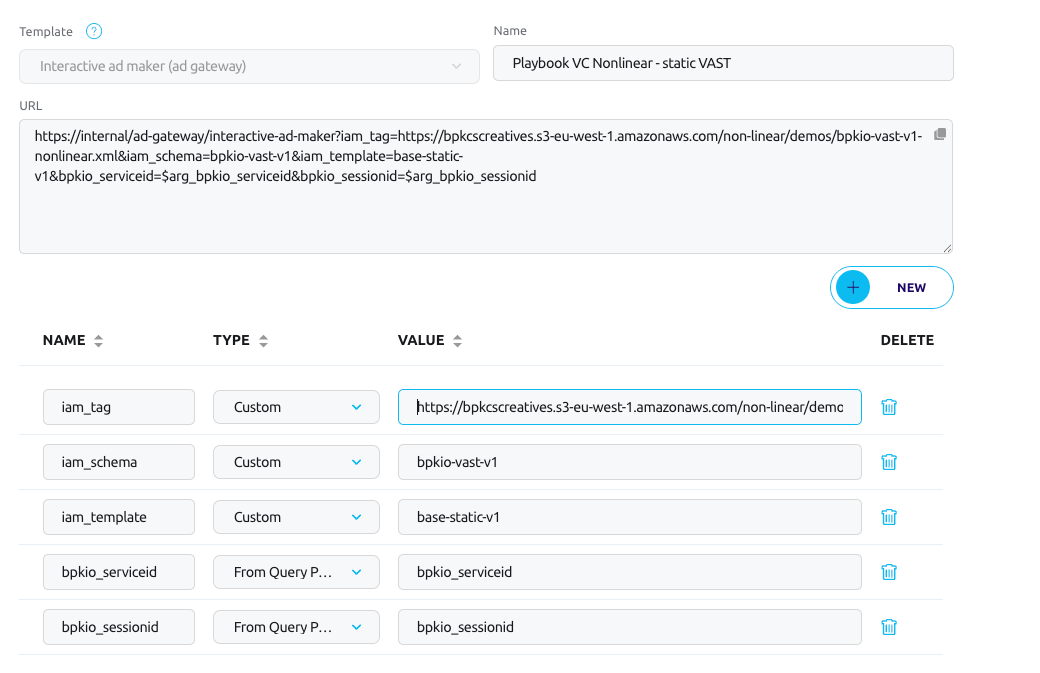
When you save or update this type of Ad Server source, you will see that 2 additional parameters are automatically added:
bpkio_serviceidandbpkio_sessionid. This is necessary to enable full tracking functionality of non-linear ads.
Query parameters for the ad server
Any other parameter that does not start with iam_ will added to the query string in the request made by the Ad Gateway to the ad server.
This provides a very flexible way of defining additional query parameters that need sending to the ad server, without having to URL-encode them and add them to the value of iam_tag, and is in particular useful for any parameter that needs to be dynamically forwarded or remapped from the streaming URL (See Ad Macros for details).
Combining with the VMAP Generator
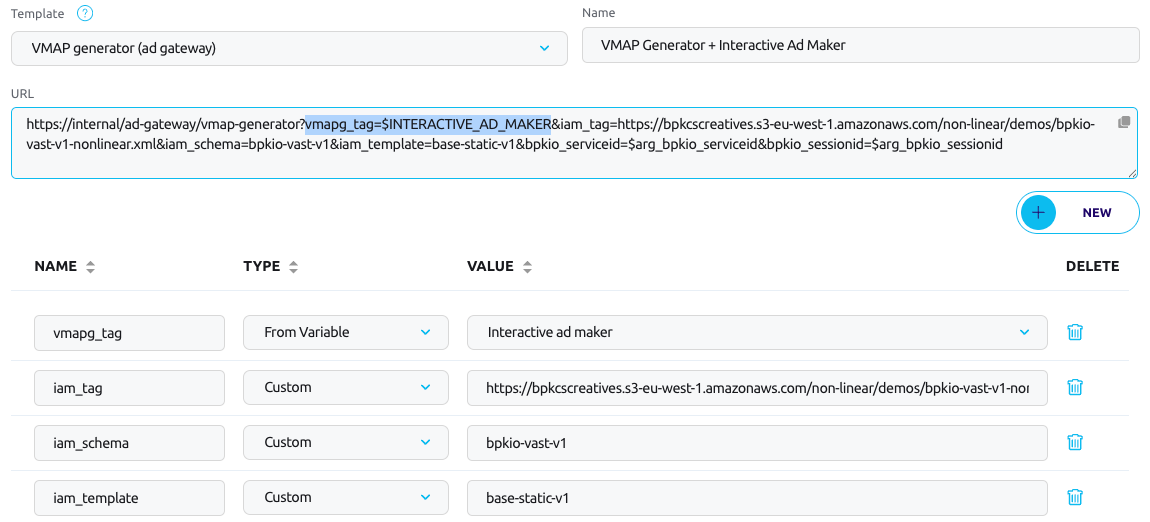
For AVOD, the VMAP Generator and the Interactive Ad Maker modules can be combined to define multiple cuepoints in VOD assets.
To do so, your Ad Server source must:
- use the VMAP Generator template
- set the parameter
vmapg_tagURL to the variable$INTERACTIVE_AD_MAKER - set other
vmapg_*andiam_*parameters as defined above and in VMAP Generator
Linear and non-linear ad breaks
It is not currently possible to configure the VMAP Generator to define different cuepoints for linear (video) ads and non-linear ads.
Updated 21 days ago